
R211x-HP Flexfabric 11900 Security Configuration Guide

144
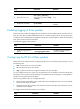
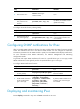
Task Command
Display IPsec policy information.
display ipsec { ipv6-policy | policy } [ policy-name
[ seq-number ] ]
Display IPsec transform set information. display ipsec transform-set [ transform-set-name ]
Display IPsec SA information.
display ipsec sa [ brief | count | interface interface-type
interface-number | { ipv6-policy | policy } policy-name
[ seq-number ] | profile policy-name | remote [ ipv6 ]
ip-address ]
Display IPsec statistics. display ipsec statistics [ tunnel-id tunnel-id ]
Display IPsec tunnel information. display ipsec tunnel { brief | count | tunnel-id tunnel-id }
Clear IPsec SAs.
reset ipsec sa [ { ipv6-policy | policy } policy-name
[ seq-number ] | profile policy-name | remote
{ ipv4-address | ipv6 ipv6-address } | spi { ipv4-address |
ipv6 ipv6-address } { ah | esp } spi-num ]
Clear IPsec statistics. reset ipsec statistics [ tunnel-id tunnel-id ]
IPsec configuration examples
Configuring a manual mode IPsec tunnel for IPv4 packets
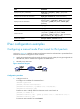
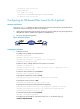
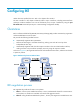
As shown in Figure 43, establish an IPsec tunnel between Switch A and Switch B to protect data flows
between the switches. Configure the tunnel as follows:
• Specify the encapsulation mode as tunnel, the security protocol as ESP, the encryption algorithm as
AES-CBC-192, and the authentication algorithm as HMAC-SHA1.
• Manually set up IPsec SAs.
Figure 43 Network diagram
Configuration procedure
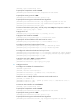
1. Configure Switch A:
# Configure an IP address for VLAN-interface 1.
<SwitchA> system-view
[SwitchA] interface vlan-interface 1
[SwitchA-Vlan-interface1] ip address 2.2.2.1 255.255.255.0
[SwitchA-Vlan-interface1] quit
# Define an ACL to identify data flows between Switch A and Switch B.
[SwitchA] acl number 3101
[SwitchA-acl-adv-3101] rule 0 permit ip source 2.2.2.1 0 destination 2.2.3.1 0
[SwitchA-acl-adv-3101] quit
# Create an IPsec transform set named tran1.