
R211x-HP Flexfabric 11900 Security Configuration Guide

173
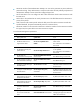
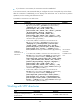
Ste
p
Command
Remarks
1. Enter system view.
system-view
N/A
2. Enable the SFTP server
function.
sftp server enable
By default, the SFTP server function
is disabled.
Configuring the user lines for Stelnet clients
Depending on the SSH application, an SSH client can be an Stelnet, SFTP, or SCP client.
The Stelnet client accesses the device through a VTY user line. You must configure the user lines for SSH
clients to allow SSH login. The configuration takes effect only on the clients at the next login.
The SFTP or SCP client accesses the device without using a VTY user line.
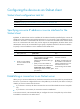
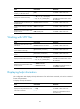
To configure the user lines for Stelnet clients:
Ste
p
Command
Remarks
1. Enter system view.
system-view
N/A
2. Enter VTY user line view.
line vty number [ ending-number ]
N/A
3. Set the login authentication
mode to scheme.
authentication-mode scheme
By default, the authentication
mode is password.
For more information about this
command, see Fundamentals
Command Reference.
Configuring a client's host public key
If the server uses publickey authentication to authentication a client, it compares the SSH username and
host public key that it receives from the client with those locally saved. If the information is consistent, it
checks the digital signature that the client sends. The digital signature is calculated by the client
according to the private key that corresponds to the host public key.
For SSH servers that use publickey authentication, password-publickey authentication, or any
authentication, you must configure the client's DSA or RSA host public key on the server, and specify the
corresponding host private key on the client to generate the digital signature. This makes the client pass
publickey authentication with the correct digital signature. If the device serves as a client, corresponding
host private key is specified by the specified public key algorithm.
You can manually configure the host public key of an SSH client on the server, or import it from the public
key file:
• Manually configuring the host public key—You can type or copy the client's host public key from
the client to the SSH server. The host public key must be in the DER encoding format without being
converted.
If you use the device to act as the client, you can use the display public-key local public command
to display the host public key and copy its contents to the server. A host public key obtained in
other ways might be in incorrect format and cannot be saved on the server. HP recommends that
you import a client's host public key from the public key file of the client.