
R211x-HP Flexfabric 11900 Security Configuration Guide

175
Configuration guidelines
When you perform the procedure in this section to configure an SSH user, follow these guidelines:
• An SSH server supports up to 1024 SSH users.
• For an SFTP or SCP user, the working directory depends on the authentication method:
{ If the authentication method is password, the working directory is authorized by AAA.
{ If the authentication method is publickey or password-publickey, the working folder is specified
by the authorization-attribute command in the associated local user view.
• For an SSH user, the user role also depends on the authentication method:
{ If the authentication method is password, the user role is authorized by the remote AAA server
or the local device.
{ If the authentication method is publickey or password-publickey, the user role is specified by
the authorization-attribute command in the associated local user view.
• If you change the authentication method or public key for an SSH user that has been logged in, the
change can take effect only on the user at the next login.
• Except password authentication, the other authentication methods require a client's host public key
to be specified. For more information about host public keys, see "Configuring a client's host public
ke
y."
• When the device operates in FIPS mode as an SSH server, the device does not support the
authentication method of any or publickey.
For information about configuring local users and remote authentication, see "Configuring AAA."
Configuration procedure
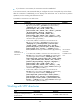
To configure an SSH user, and specify the service type and authentication method:
Ste
p
Command
1. Enter system view.
system-view
2. Create an SSH user, and
specify the service type and
authentication method.
• In non-FIPS mode:
ssh user username service-type { all | scp | sftp | stelnet }
authentication-type { password | { any | password-publickey |
publickey } assign publickey keyname }
• In non-FIPS mode:
ssh user username service-type { all | scp | sftp | stelnet }
authentication-type { password | password-publickey assign
publickey keyname }
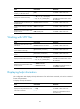
Setting the SSH management parameters
Setting the SSH management parameters can improve the security of SSH connections. The SSH
management parameters include:
• Whether the SSH server is compatible with SSH1 clients.
• RSA server key pair update interval, applicable to users using SSH1 clients.
• SSH user authentication timeout period. You can set this parameter to reject a connection if the
authentication for the connection has not been finished when the timeout period expires.