
R211x-HP Flexfabric 11900 Security Configuration Guide

176
• Maximum number of SSH authentication attempts. You can set this parameter to prevent malicious
password cracking. If any authentication is used, the total number of both publickey and password
authentication attempts cannot exceed the configured upper limit.
• ACL for SSH clients. You can configure an ACL to filter SSH clients which initiate connections with
the SSH server.
• DSCP value in the packets that are sent by the SSH server. This field determines the transmission
priority of the packet.
• SFTP connection idle timeout period. When the idle period of an SFTP connection exceeds the
specified threshold, the system automatically tears the connection down.
• Maximum number of concurrent online SSH users. When the number of online SSH users reaches
the upper limit, the system refuses new SSH connection requests.
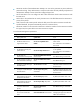
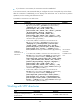
To set the SSH management parameters:
Ste
p
Command
Remarks
1. Enter system view.
system-view
N/A
2. Enable the SSH server to
support SSH1 clients.
ssh server compatible-ssh1x
enable
By default, the SSH server supports
SSH1 clients.
This command is not available in
FIPS mode.
3. Set the RSA server key pair
update interval.
ssh server rekey-interval hours
By default, the RSA server key pair
is not updated.
This command is not available in
FIPS mode.
4. Set the SSH user
authentication timeout period.
ssh server authentication-timeout
time-out-value
The default setting is 60 seconds.
5. Set the maximum number of
SSH authentication attempts.
ssh server authentication-retries
times
The default setting is 3.
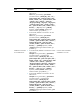
6. Configure an ACL filtering for
IPv4 SSH clients.
ssh server acl acl-number
By default, all IPv4 SSH users are
allowed to initiate connections with
the SSH server.
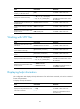
7. Configure an ACL filtering for
IPv6 SSH clients.
ssh server ipv6 acl [ ipv6 ]
acl-number
By default, all IPv6 SSH users are
allowed to initiate connections with
the SSH server.
8. Set the DSCP value in the IPv4
packets that the SSH server
sends to the SSH clients.
ssh server dscp dscp-value By default, the DSCP value is 48.
9. Set the DSCP value in the IPv6
packets that the SSH server
sends to the SSH clients.
ssh server ipv6 dscp dscp-value By default, the DSCP value is 48.
10. Configure the SFTP
connection idle timeout
period.
sftp server idle-timeout
time-out-value
The default setting is 10 minutes.
11. Specify the maximum number
of concurrent online SSH
users.
aaa session-limit ssh max-sessions
The default setting is 16.
Changing the upper limit does not
affect online SSH users.