
R211x-HP Flexfabric 11900 Security Configuration Guide

180
• If you choose to not continue, the connection cannot be established.
In an insecure network, HP recommends that you configure the server's host public key on the device.
After the connection is established, you can directly enter SFTP client view on the server to perform
operations, such as working with directories or files.
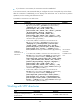
To establish a connection to an SFTP server:
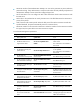
Task Command Remarks
Establish a
connection to an
SFTP server.
• In non-FIPS mode, establish a connection to an IPv4 SFTP server:
sftp server [ port-number ] [ vpn-instance vpn-instance-name ]
[ identity-key { dsa | rsa } | prefer-compress zlib |
prefer-ctos-cipher { 3des | aes128 | aes256 | des } |
prefer-ctos-hmac { md5 | md5-96 | sha1 | sha1-96 } | prefer-kex
{ dh-group-exchange | dh-group1 | dh-group14 } |
prefer-stoc-cipher { 3des | aes128 | aes256 | des } |
prefer-stoc-hmac { md5 | md5-96 | sha1 | sha1-96 } ] * [ dscp
dscp-value | publickey keyname | source { interface interface-type
interface-number | ip ip-addres} ] *
• In FIPS mode, establish a connection to an IPv4 SFTP server:
sftp server [ port-number ] [ vpn-instance vpn-instance-name ]
[ identity-key rsa | prefer-compress zlib | prefer-ctos-cipher
{ aes128 | aes256 } | prefer-ctos-hmac { sha1 | sha1-96 } |
prefer-kex dh-group14 | prefer-stoc-cipher { aes128 | aes256 } |
prefer-stoc-hmac { sha1 | sha1-96 } ] * [ publickey keyname |
source { interface interface-type interface-number | ip ip-address } ]
*
• In non-FIPS mode, establish a connection to an IPv6 SFTP server:
sftp ipv6 server [ port-number ] [ vpn-instance vpn-instance-name ]
[ -i interface-type interface-number ] [ identity-key { dsa | rsa } |
prefer-compress zlib | prefer-ctos-cipher { 3des | aes128 | aes256
| des } | prefer-ctos-hmac { md5 | md5-96 | sha1 | sha1-96 } |
prefer-kex { dh-group-exchange | dh-group1 | dh-group14 } |
prefer-stoc-cipher { 3des | aes128 | aes256 | des } |
prefer-stoc-hmac { md5 | md5-96 | sha1 | sha1-96 } ] * [ dscp
dscp-value | publickey keyname | source { interface interface-type
interface-number | ipv6 ipv6-addres} ] *
• In FIPS mode, establish a connection to an IPv6 SFTP server:
sftp ipv6 server [ port-number ] [ vpn-instance vpn-instance-name ]
[ -i interface-type interface-number ] [ identity-key rsa|
prefer-compress zlib | prefer-ctos-cipher { aes128 | aes256 } |
prefer-ctos-hmac { sha1 | sha1-96 } | prefer-kex dh-group14 |
prefer-stoc-cipher { aes128 | aes256 } | prefer-stoc-hmac { sha1 |
sha1-96 } ] * [ publickey keyname | source { interface interface-type
interface-number | ipv6 ipv6-addres} ] *
Use one of the
commands.
Available in user
view.
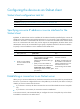
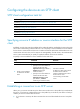
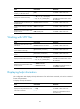
Working with SFTP directories
Task Command
Remarks
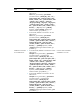
Change the working directory on
the SFTP server.
cd [ remote-path ] Available in SFTP client view.
Return to the upper-level directory. cdup Available in SFTP client view.