
R211x-HP Flexfabric 11900 Security Configuration Guide


184
Task Command
Display the source IP address or source
interface information configured for the Stelnet
client.
display ssh client source
Display SSH server status information or session
information on an SSH server.
display ssh server { session | status }
Display SSH user information on the SSH
server.
display ssh user-information [ username ]
Display the public keys of the local key pairs.
display public-key local { dsa | rsa } public [ name
publickey-name ]
Display the public keys of the SSH peers. display public-key peer [ brief | name publickey-name ]
Stelnet configuration examples
Unless otherwise noted, devices in the configuration examples operate in non-FIPS mode.
If you configure an Stelnet server in FIPS mode, follow these guidelines:
• The modulus length of the key pair must be 2048 bits.
• Do not generate a DSA key pair on the Stelnet server. Only RSA key pairs are supported.
Password authentication enabled Stelnet server configuration
example
Network requirements
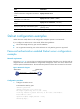
As shown in Figure 48, you can log in to Switch through the Stelnet client that runs on the host and are
assigned the user role network-admin for configuration management. Switch acts as the Stelnet server
and uses password authentication. The username and password of the client are saved on the switch.
Figure 48 Network diagram
Configuration procedure
1. Configure the Stelnet server:
# Generate the RSA key pairs.
<Switch> system-view
[Switch] public-key local create rsa
The range of public key size is (512 ~ 2048).
If the key modulus is greater than 512, it will take a few minutes.
Press CTRL+C to abort.
Input the modulus length [default = 1024]:
Generating Keys...
Vlan-int2
192.168.1.40/24
Stelnet client Stelnet server
Host
192.168.1.56/24
Switch