
R211x-HP Flexfabric 11900 Security Configuration Guide


190
# Create a local device management user client002 with the service type ssh and the user role
network-admin.
[Switch] local-user client002 class manage
[Switch-luser-manage-client002] service-type ssh
[Switch-luser-manage-client002] authorization-attribute user-role network-admin
[Switch-luser-manage-client002] quit
3. Specify the private key file and establish a connection to the Stelnet server:
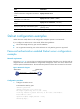
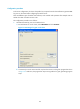
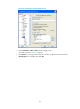
a. Launch PuTTY.exe on the Stelnet client to enter the interface shown in Figure 54.
b. In the Ho
st Name (or IP address) field, enter the IP address 192.168.1.40 of the Stelnet server.
Figure 54 Specifying the host name (or IP address)
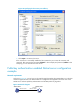
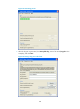
c. Select Connection > SSH from the navigation tree.
The window shown in Figure 55 appears.
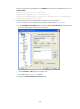
d. Specify th
e Preferred SSH protocol version as 2.