
R211x-HP Flexfabric 11900 Security Configuration Guide


195
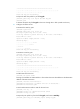
<SwitchA> ssh2 192.168.1.40 publickey key1
Username: client001
client001@192.168.1.40's password:
After you enter the correct password, you successfully log in to Switch B.
{ If you do not configure the server's host public key on the client, when you access the server, the
system will ask you whether to continue with the access. Select Yes to access the server and
download the server's host public key.
<SwitchA> ssh2 192.168.1.40
Username: client001
The server is not authenticated. Continue? [Y/N]:y
Do you want to save the server public key? [Y/N]:y
client001@192.168.1.40's password:
After you enter the correct password, you can access Switch B successfully. At the next
connection attempt, the client authenticates the server by using the saved server's host public
key on the client.
Publickey authentication enabled Stelnet client configuration
example
Network requirements
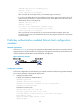
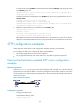
As shown in Figure 58, you can log in to Switch B through the Stelnet client that runs on Switch A and are
assigned the user role network-admin for configuration management. Switch B acts as the Stelnet server
and uses publickey authentication and the DSA public key algorithm.
Figure 58 Network diagram
Configuration procedure
In the server configuration, the client public key is required. Use the client software to generate a DSA key
pair on the client before configuring the Stelnet server.
1. Configure the Stelnet client:
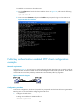
# Assign an IP address to VLAN-interface 2.
<SwitchA> system-view
[SwitchA] interface vlan-interface 2
[SwitchA-Vlan-interface2] ip address 192.168.1.56 255.255.255.0
[SwitchA-Vlan-interface2] quit
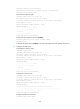
# Generate a DSA key pair.
[SwitchA] public-key local create dsa
The range of public key size is (512 ~ 2048).
If the key modulus is greater than 512, it will take a few minutes.
Press CTRL+C to abort.
Input the modulus length [default = 1024]:
Generating Keys...