
R211x-HP Flexfabric 11900 Security Configuration Guide




224
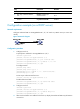
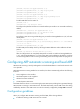
[SwitchA] display arp all
Type: S-Static D-Dynamic O-Openflow M-Multiport I-Invalid
IP Address MAC Address VLAN Interface Aging Type
10.1.1.2 0012-3f86-e94c N/A XGE1/0/1 20 D
The output shows that IP address 10.1.1.2 has been assigned to Switch B.
Switch B must use the IP address and MAC address in the authorized ARP entry to communicate
with Switch A. Otherwise, the communication fails. Thus user validity is ensured.
Configuration example (on a DHCP relay agent)
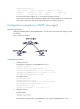
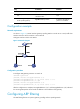
Network requirements
Configure authorized ARP on Ten-GigabitEthernet 1/0/2 of Switch B (a DHCP relay agent) to ensure
user validity.
Figure 71 Network diagram
Configuration procedure
1. Configure Switch A:
# Specify the IP address for Ten-GigabitEthernet 1/0/1.
<SwitchA> system-view
[SwitchA] interface ten-gigabitethernet 1/0/1
[SwitchA-Ten-GigabitEthernet1/0/1] port link-mode route
[SwitchA-Ten-GigabitEthernet1/0/1] ip address 10.1.1.1 24
[SwitchA-Ten-GigabitEthernet1/0/1] quit
# Configure DHCP.
[SwitchA] dhcp enable
[SwitchA] dhcp server ip-pool 1
[SwitchA-dhcp-pool-1] network 10.10.1.0 mask 255.255.255.0
[SwitchA-dhcp-pool-1] gateway-list 10.10.1.1
[SwitchA-dhcp-pool-1] quit
[SwitchA] ip route-static 10.10.1.0 24 10.1.1.2
2. Configure Switch B:
# Enable DHCP.
<SwitchB> system-view
[SwitchB] dhcp enable
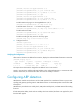
# Specify the IP addresses of Ten-GigabitEthernet 1/0/1 and Ten-GigabitEthernet 1/0/2.