
R211x-HP Flexfabric 11900 Security Configuration Guide




231
Ste
p
Command
Remarks
1. Enter system view.
system-view N/A
2. Enter Layer 2 Ethernet interface
view.
interface interface-type
interface-number
N/A
3. Enable ARP gateway protection
for the specified gateway.
arp filter source ip-address
By default, ARP gateway
protection is disabled.
Configuration example
Network requirements
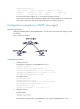
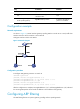
As shown in Figure 73, Host B launches gateway spoofing attacks to Switch B. As a result, traffic that
Switch B intends to send to Switch A is sent to Host B.
Configure Switch B to block such attacks.
Figure 73 Network diagram
Configuration procedure
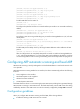
# Configure ARP gateway protection on Switch B.
<SwitchB> system-view
[SwitchB] interface ten-gigabitethernet 1/0/1
[SwitchB-Ten-GigabitEthernet1/0/1] arp filter source 10.1.1.1
[SwitchB-Ten-GigabitEthernet1/0/1] quit
[SwitchB] interface ten-gigabitethernet 1/0/2
[SwitchB-Ten-GigabitEthernet1/0/2] arp filter source 10.1.1.1
After the configuration is complete, Ten-GigabitEthernet 1/0/1 and Ten-GigabitEthernet 1/0/2 discard
the incoming ARP packets whose sender IP address is the IP address of the gateway.
Configuring ARP filtering
The ARP filtering feature can prevent gateway spoofing and user spoofing attacks.