
R211x-HP Flexfabric 11900 Security Configuration Guide

21
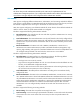
Ste
p
Command
Remarks
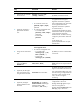
8. (Optional.) Configure
authorization attributes for
the local user.
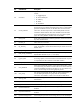
authorization-attribute { acl
acl-number | idle-cut minute |
user-role role-name | vlan vlan-id |
work-directory directory-name } *
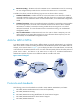
The following default settings apply:
• No authorization ACL, idle
timeout period, or authorized
VLAN is configured for local
users.
• FTP, SFTP, or SCP users have the
root directory of the NAS set as
the working directory, but they do
not have the access permission to
the root directory.
• The network-operator user role is
assigned to local users that are
created by a network-admin or
level-15 user on the default MDC.
• The mdc-operator user role is
assigned to local users that are
created by an mdc-admin or
level-15 user on a non-default
MDC.
For LAN users, only the settings for
acl, idle-cut, and vlan take effect.
For Telnet and terminal users, only
the setting for user-role takes effect.
For SSH and FTP users, only the
settings for user-role and
work-directory take effect.
For other types of local users, no
authorization attribute takes effect.
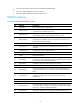
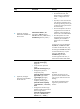
9. (Optional.) Configure
password control attributes
for the local user.
• Set the password aging time:
password-control aging
aging-time
• Set the minimum password
length:
password-control length length
• Configure the password
composition policy:
password-control composition
type-number type-number
[ type-length type-length ]
• Configure the password
complexity checking policy:
password-control complexity
{ same-character | user-name }
check
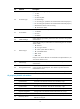
• Configure the maximum login
attempts and the action to take if
there is a login failure:
password-control login-attempt
login-times [ exceed { lock |
lock-time time | unlock } ]
Optional.
By default, the local user uses
password control attributes of the
user group to which the local user
belongs.
Only device management users
support the password control
function.