
R211x-HP Flexfabric 11900 Security Configuration Guide

22
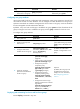
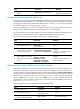
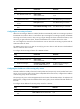
Ste
p
Command
Remarks
10. (Optional.) Assign the
local user to a user group.
group group-name
By default, a local user belongs to the
default user group system.
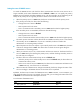
Configuring user group attributes
User groups simplify local user configuration and management. A user group comprises a group of local
users and has a set of local user attributes. You can configure local user attributes for a user group to
implement centralized user attributes management for the local users in the group. Local user attributes
that are manageable include authorization attributes.
By default, every new local user belongs to the default user group system and has all attributes of the
group. To assign a local user to a different user group, use the group command in local user view.
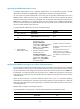
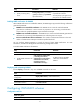
To configure user group attributes:
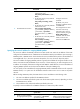
Ste
p
Command
Remarks
1. Enter system view.
system-view N/A
2. Create a user group and
enter its view.
user-group group-name
By default, there is a
system-defined user group named
system, which is the default user
group.
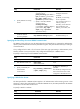
3. Configure authorization
attributes for the user group.
authorization-attribute { acl
acl-number | idle-cut minute | vlan
vlan-id | work-directory
directory-name } *
By default, no authorization
attribute is configured for a user
group.
4. (Optional.) Configure
password control attributes
for the user group.
• Set the password aging time:
password-control aging
aging-time
• Set the minimum password length:
password-control length length
• Configure the password
composition policy:
password-control composition
type-number type-number
[ type-length type-length ]
• Configure the password
complexity checking policy:
password-control complexity
{ same-character | user-name }
check
• Configure the maximum login
attempts and the action to take for
login failures:
password-control login-attempt
login-times [ exceed { lock |
lock-time time | unlock } ]
Optional.
By default, the user group uses
the global password control
settings. For more information,
see "Configuring password
contro
l."
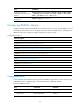
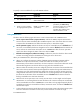
Displaying and maintaining local users and local user groups
Execute display commands in any view.