
R211x-HP Flexfabric 11900 Security Configuration Guide

27
Setting the status of RADIUS servers
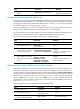
To control the RADIUS servers with which the device communicates when the current servers are no
longer available, set the status of RADIUS servers to blocked or active. You can specify one primary
RADIUS server and multiple secondary RADIUS servers, with the secondary servers functioning as the
backup of the primary servers. Typically, the device chooses servers based on these rules:
• When the primary server is in active state, the device communicates with the primary server.
• If the primary server fails, the device does the following:
{ Changes the server's status to blocked.
{ Starts a quiet timer for the server.
{ Tries to communicate with a secondary server in active state that has the highest priority.
• If the secondary server is unreachable, the device does the following:
{ Changes the server's status to blocked.
{ Starts a quiet timer for the server.
{ Tries to communicate with the next secondary server in active state that has the highest priority.
• The search process continues until the device finds an available secondary server or has checked
all secondary servers in active state. If no server is available, the device considers the
authentication or accounting attempt a failure.
• When the quiet timer of a server expires or you manually set the server to the active state, the status
of the server changes back to active. The device does not check the server again during the
authentication or accounting process.
• When you remove a server in use, communication with the server times out. The device looks for a
server in active state by first checking the primary server, and then checking secondary servers in
the order they are configured.
• The device does not communicate with any servers in blocked state.
{ When the primary server and secondary servers are all in blocked state, the device does not
communicate with any server.
{ When one or more servers are in active state, the device tries to communicate with these servers
in active state only, even if the server is unavailable.
• When the status of a RADIUS server changes automatically, the device changes the status of this
server accordingly in all RADIUS schemes in which this server is specified.
By default, the device sets the status of all RADIUS servers to active. However, in some situations, you
must change the status of a server. For example, if a server fails, you can change the status of the server
to blocked to avoid communication attempts to the server.
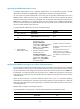
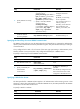
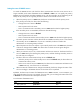
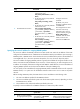
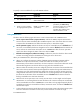
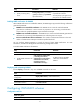
To set the status of RADIUS servers:
Ste
p
Command
Remarks
1. Enter system view.
system-view N/A
2. Enter RADIUS scheme view.
radius scheme radius-scheme-name N/A