
R211x-HP Flexfabric 11900 Security Configuration Guide
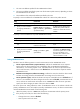
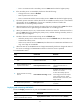
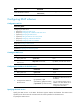
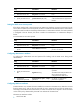

41
Displaying and maintaining LDAP
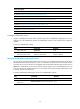
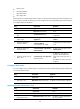
Execute the display command in any view.
Task Command
Display the configuration of LDAP schemes. display ldap scheme [ scheme-name ]
Configuring AAA methods for ISP domains
You configure AAA methods for an ISP domain by referencing configured AAA schemes in ISP domain
view. Each ISP domain has a set of system-defined AAA methods, which are local authentication, local
authorization, and local accounting. If you do not configure any AAA methods for an ISP domain, the
device uses the system-defined AAA methods for users in the domain.
The AAA feature handles login users only after you enable scheme authentication for these users. For
more information about the login authentication modes, see Fundamentals Configuration Guide.
Configuration prerequisites
To use local authentication for users in an ISP domain, configure local user accounts on the device first.
See "Configuring local user attributes."
To use remote authentication, authorization, and accounting, create the required RADIUS, HWTACACS,
and LDAP schemes as described in "Configuring RADIUS schemes," "Configuring HWTACACS
sc
hemes," and "Configuring LDAP schemes."
Creating an ISP domain
In a networking scenario with multiple ISPs, the device can connect to users of different ISPs, and these
users can have different user attributes, such as different username and password structures, different
service types, and different rights. To manage users of different ISPs, configure ISP domains, and
configure AAA methods and domain attributes for each ISP domain as needed.
The device supports up to 16 ISP domains, including the system-defined ISP domain system. You can
specify one of the ISP domains as the default domain. You can modify the settings of the ISP domain
system, but you cannot delete the domain.
On the device, each user belongs to an ISP domain. If a user provides no ISP domain name at login, the
device considers the user belongs to the default ISP domain.
To delete the ISP domain functioning as the default ISP domain, change it to a non-default ISP domain by
using the undo domain default enable command.
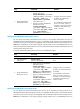
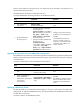
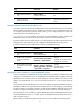
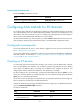
To create an ISP domain:
Ste
p
Command
Remarks
1. Enter system view.
system-view N/A
2. Create an ISP domain and
enter ISP domain view.
domain isp-name N/A