
R211x-HP Flexfabric 11900 Security Configuration Guide

43
• To specify a scheme for user role authentication, make sure the user role is in the format of level-n.
If an HWTACACS scheme is specified, the device uses the entered username for role authentication.
If a RADIUS scheme is specified, the device uses the username $enabn$ on the RADIUS server for
role authentication, where n is the same as that in the target user role level-n.
Configuration procedure
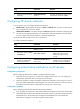
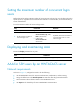
To configure authentication methods for an ISP domain:
Step Command Remarks
1. Enter system view.
system-view N/A
2. Enter ISP domain view.
domain isp-name N/A
3. Specify the default
authentication method for
all types of users.
authentication default { hwtacacs-scheme
hwtacacs-scheme-name [ radius-scheme
radius-scheme-name ] [ local ] [ none ] |
ldap-scheme ldap-scheme-name [ local ]
[ none ] | local [ none ] | none | radius-scheme
radius-scheme-name [ hwtacacs-scheme
hwtacacs-scheme-name ] [ local ] [ none ] }
By default, the default
authentication method is
local.
The none keyword is not
supported in FIPS mode.
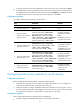
4. Specify the authentication
method for LAN users.
authentication lan-access { ldap-scheme
ldap-scheme-name [ local ] [ none ] | local
[ none ] | none | radius-scheme
radius-scheme-name [ local ] [ none ] }
By default, the default
authentication method is
used for LAN users.
The none keyword is not
supported in FIPS mode.
5. Specify the authentication
method for login users.
authentication login { hwtacacs-scheme
hwtacacs-scheme-name [ radius-scheme
radius-scheme-name ] [ local ] [ none ] |
ldap-scheme ldap-scheme-name [ local ]
[ none ] | local [ none ] | none | radius-scheme
radius-scheme-name [ hwtacacs-scheme
hwtacacs-scheme-name ] [ local ] [ none ] }
By default, the default
authentication method is
used for login users.
The none keyword is not
supported in FIPS mode.
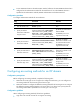
6. Specify the user role
authentication method.
authentication super { hwtacacs-scheme
hwtacacs-scheme-name | radius-scheme
radius-scheme-name } *
By default, the default
authentication method is
used for user role
authentication.
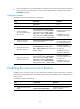
Configuring authorization methods for an ISP domain
Configuration prerequisites
Before configuring authorization methods, complete the following tasks:
1. Determine the access type or service type to be configured. With AAA, you can configure an
authorization scheme for each access type and service type.
2. Determine whether to configure the default authorization method for all access types or service
types. The default authorization method applies to all access users, but it has a lower priority than
the authorization method that is specified for an access type or service type.
Configuration guidelines
When configuring authorization methods, follow these guidelines:
• The device supports HWTACACS authorization but not LDAP authorization.