
R211x-HP Flexfabric 11900 Security Configuration Guide

46
Setting the maximum number of concurrent login
users
Perform this task to set the maximum number of concurrent users who can log on to the device through a
specific protocol, regardless of their authentication methods: no authentication, local authentication, or
remote authentication.
To set the maximum number of concurrent login users:
Step Command Remarks
1. Enter system view.
system-view N/A
2. Set the maximum number of
concurrent login users.
• In non-FIPS mode:
aaa session-limit { ftp | ssh |
telnet } max-sessions
• In FIPS mode:
aaa session-limit ssh
max-sessions
By default, the maximum number of
concurrent login users is 16 for
each user type.
Displaying and maintaining AAA
Execute the display command in any view.
Task Command
Display the configuration of ISP domains. display domain [ isp-name ]
AAA for SSH users by an HWTACACS server
Network requirements
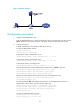
As shown in Figure 11, configure the switch to do the following:
• Use the HWTACACS server for SSH user authentication, authorization, and accounting.
• Assign the default user role network-operator to SSH users after they pass authentication.
• Send usernames without domain names to the HWTACACS server.
• Use expert as the shared keys for secure HWTACACS communication.