
R211x-HP Flexfabric 11900 Security Configuration Guide
53
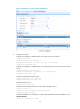
# Create a RADIUS scheme.
[Switch] radius scheme rad
# Specify the primary authentication server.
[Switch-radius-rad] primary authentication 10.1.1.1 1812
# Set the shared key for secure communication with the server to expert in plain text.
[Switch-radius-rad] key authentication simple expert
# Include the domain names in usernames sent to the RADIUS server.
[Switch-radius-rad] user-name-format with-domain
[Switch-radius-rad] quit
# Create ISP domain bbb and configure authentication, authorization, and accounting methods
for login users.
[Switch] domain bbb
[Switch-isp-bbb] authentication login radius-scheme rad
[Switch-isp-bbb] authorization login radius-scheme rad
[Switch-isp-bbb] accounting login none
[Switch-isp-bbb] quit
Verifying the configuration
When the user initiates an SSH connection to the switch and enter the username hello@bbb and the
correct password, the user successfully logs in and can use the commands for the network-operator user
role.
Authentication for SSH users by an LDAP server
Network requirements
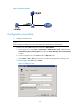
As shown in Figure 16, an LDAP server is located at 10.1.1.1/24 and uses the domain name ldap.com.
Configure the switch to do the following:
• Use the LDAP server to authenticate SSH users.
• Assign the default user role network-operator to SSH users after they pass authentication.
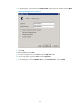
On the LDAP server, set the administrator password to admin!123456, add user aaa, and set the user's
password to ldap!123456.