
R211x-HP Flexfabric 11900 Security Configuration Guide

54
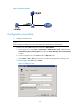
Figure 16 Network diagram
Configuration procedure
1. Configure the LDAP server:
NOTE:
In this example, the LDAP server runs Microsoft Windows 2003 Server Active Directory.
# Add a user named aaa and set the password to ldap!123456.
a. On the LDAP server, select Start > Control Panel > Administrative Tools, and double-click
Active Directory Users and Computers to display the Active Directory Users and Computers
window.
b. From the navigation tree, click Users under the ldap.com node.
c. Select Action > New > User from the menu to display the dialog box for adding a user.
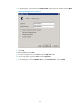
d. Enter the login name aaa and click Next.
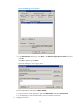
Figure 17 Adding user aaa