
R211x-HP Flexfabric 11900 Security Configuration Guide
58
Verifying the configuration
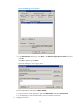
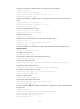
When the user initiates an SSH connection to the switch and enter the username aaa@bbb and
password ldap!123456, the user successfully logs in and can use the commands for the network-operator
user role.
Troubleshooting RADIUS
RADIUS authentication failure
Symptom
User authentication always fails.
Analysis
Possible reasons include:
• A communication failure exists between the NAS and the RADIUS server.
• The username is not in the format userid@isp-name, or the ISP domain is not correctly configured on
the NAS.
• The user is not configured on the RADIUS server.
• The password entered by the user is incorrect.
• The RADIUS server and the NAS are configured with different shared keys.
Solution
Check that:
• The NAS and the RADIUS server can ping each other.
• The username is in the userid@isp-name format and the ISP domain is correctly configured on the
NAS.
• The user is configured on the RADIUS server.
• The correct password is entered.
• The same shared key is configured on both the RADIUS server and the NAS.
RADIUS packet delivery failure
Symptom
RADIUS packets cannot reach the RADIUS server.
Analysis
Possible reasons include:
• A communication failure exists between the NAS and the RADIUS server.
• The NAS is not configured with the IP address of the RADIUS server.
• The authentication and accounting UDP ports configured on the NAS are incorrect.
• The RADIUS server's authentication and accounting port numbers are being used by other
applications.