
R211x-HP Flexfabric 11900 Security Configuration Guide

84
MAC authentication configuration examples
Local MAC authentication configuration example
Network requirements
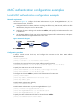
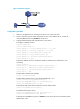
As shown in Figure 32, configure local MAC authentication on port Ten-GigabitEthernet 1/0/1 to
control Internet access, as follows:
• Configure the device to detect whether a user has gone offline every 180 seconds, and if a user fails
authentication, deny the user for 180 seconds.
• Configure all users to belong to the ISP domain aabbcc, and specify local authentication for users
in the domain.
• Use the MAC address of each user as the username and password for authentication, and require
the MAC addresses be hyphenated and in lower case.
Figure 32 Network diagram
Configuration procedure
# Add a network access local user, and configure the username as the host's MAC address
00-e0-fc-12-34-56.
<Device> system-view
[Device] local-user 00-e0-fc-12-34-56 class network
# Configure the password as the host's MAC address 00-e0-fc-12-34-56.
[Device-luser-network-00-e0-fc-12-34-56] password simple 00-e0-fc-12-34-56
# Specify the LAN access service for the account.
[Device-luser-network-00-e0-fc-12-34-56] service-type lan-access
[Device-luser-network-00-e0-fc-12-34-56] quit
# Configure ISP domain aabbcc to perform local authentication for LAN users.
[Device] domain aabbcc
[Device-isp-aabbcc] authentication lan-access local
[Device-isp-aabbcc] quit
# Enable MAC authentication globally.
[Device] mac-authentication
# Enable MAC authentication on port Ten-GigabitEthernet 1/0/1.
[Device] interface ten-gigabitethernet 1/0/1
[Device-Ten-GigabitEthernet1/0/1] mac-authentication
[Device-Ten-GigabitEthernet1/0/1] quit
# Specify the MAC authentication domain as the ISP domain aabbcc.
[Device] mac-authentication domain aabbcc