
R211x-HP Flexfabric 11900 TRILL Configuration Guide



9
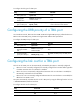
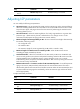
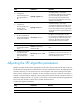
3. Enable automatic link cost
calculation for TRILL ports.
auto-cost enable
By default, automatic link cost
calculation is enabled for TRILL
ports.
4. Return to system view.
quit N/A
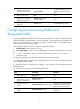
5. Enter Layer 2 Ethernet
interface view or Layer 2
aggregate interface view.
interface interface-type
interface-number
N/A
6. Configure the link cost for a
TRILL port.
trill cost value The default setting is 2000.
Configuring the announcing VLANs and
designated VLAN
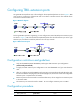
Announcing VLANs forward Hello frames between RBs. The DRB uses the VLANs in the following set for
sending Hello frames: enabled VLANs ∩ (announcing VLANs ∪ designated VLAN). A non-DRB uses the
VLANs in the following set for sending Hello frames: enabled VLANs ∩ (designated VLAN ∪
(announcing VLANs ∩ forwarding VLANs)).
The concepts and symbols used in this section are explained as follows:
• Enabled VLAN—VLAN enabled on the port.
• Forwarding VLAN—VLANs for which an RBridge port is appointed VLAN forwarder on the port.
• ∩ and ∪—Set operation symbols. ∩ indicates set-theoretic intersection, and ∪ indicates
set-theoretic union.
The designated VLAN forwards TRILL frames (except Hello frames) between RBs.
If no designated VLAN is configured for the DRB of a link, the frames are exchanged through the
lowest-numbered enabled VLAN.
If a designated VLAN is configured for the DRB of a link, the frames are exchanged through the
designated VLAN.
To configure the announcing VLANs and designated VLAN:
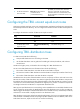
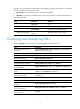
Step Command Remarks
1. Enter system view.
system-view N/A
2. Enter Layer 2 Ethernet
interface view or Layer 2
aggregate interface view.
interface interface-type
interface-number
N/A
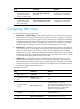
3. Configure announcing
VLANs.
trill announcing-vlan { vlan-list | null }
By default, no announcing VLAN is
configured, and the announcing
VLANs are the enabled VLANs.
4. Configure the designated
VLAN.
trill designated-vlan vlan-id
By default, no designated VLAN is
configured.