
R211x-HP Flexfabric 11900 TRILL Configuration Guide



10
Configuring TRILL extension ports
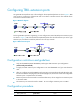
An egress RB cannot perform Layer 3 forwarding for de-encapsulated packets. As shown Figure 6, RB2
must connect to a gateway to communicate with a core device in another network. This method causes
inconvenience and increases costs.
Figure 6 Network diagram
For the egress RB to operate as a gateway, you can configure two internal 40-GE ports as extension ports.
As shown in Figure 7, R
B 2 forwards de-encapsulated packets from the left extension port to the right
extension port, and then forwards the packets to the core layer network.
Figure 7 TRILL extension ports
Configuration restrictions and guidelines
• Only LSU1TGS48SF0 (LSUM1TGS48SF0) cards support TRILL extension port configuration
(switch-mode port-extender).
• To apply new TRILL extension port configuration on an LSU1TGS48SF0 card, you must reboot the
card.
• After you configure an LSU1TGS48SF0 card to operate in port-extender mode and reboot the card,
the internal interfaces FortyGigE X/0/49 and FortyGigE X/0/50 become visible and configurable
extension ports. X represents the slot number.
• Extension ports are interconnected. To avoid broadcast storm, do not assign the two extension ports
to the same VLAN.
• The extension ports cannot be used in VLAN 1. Do not configure extension ports in VLAN 1.
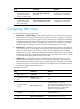
Configuration procedure
Ste
p
Command
Remarks
1. Enter system view.
system-view N/A