
R211x-HP Flexfabric 11900 TRILL Configuration Guide



15
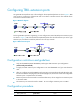
When N equal-cost links exist in the network, each TRILL distribution tree selects the link with the largest
pseudo-node ID for forwarding packets. As shown in Figure 8, t
wo equal-cost links exist between RB 1
and RB 3. Assume the link directly connecting RB 1 to RB 3 has the largest pseudo-node ID. Both the TRILL
distribution tree rooted at RB 3 and the TRILL distribution tree rooted at RB 4 select the link.
Figure 8 Multicast ECMP
When multicast ECMP is enabled, TRILL assigns equal-cost links to different TRILL distributions trees. This
improves the load sharing performance.
When N equal-cost links exist in the network, each TRILL distribution tree selects an equal-cost link for
forwarding packets through J mod N in root bridge priority order. J is the priority sequence number of a
multicast tree and starts from 0.
As shown in Figure 8:
• T
he link directly connecting RB 1 to RB 3 is assigned to the TRILL distribution tree rooted at RB 3.
• The link RB 1-RB 2-RB 3 is assigned to the TRILL distribution tree rooted at RB 4.
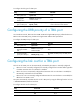
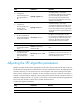
To configure the TRILL distribution trees:
Step Command Remarks
1. Enter system view.
system-view N/A
2. Enter TRILL view.
trill N/A
3. Set a priority for the RB.
tree-root priority priority The default setting is 32768.
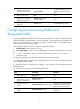
4. Configure the number of
TRILL distribution trees that
the RB wants all RBs to
compute.
trees calculate count The default setting is 1.
5. (Optional.) Enable multicast
ECMP.
multicast-ecmp enable
By default, multicast ECMP is
disabled.
Make sure the multicast ECMP
status is the same on all RBs in the
TRILL network. Otherwise,
multicast, broadcast, and
unknown unicast frames might
fail to be forwarded.
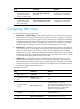
Enabling logging of TRILL neighbor changes
Perform this task to output logs of TRILL neighbor changes to the configuration terminal.
RB 1
RB 2
RB 3
RB 4
C
o
s
t
=
3
Cost = 1