
R211x-HP Flexfabric 11900 TRILL Configuration Guide




22
TRILL extension port configuration example
Network requirements
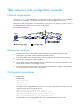
As shown in Figure 10, RB1 and RB2 are in a TRILL network. RB1 is connected to a server, and RB2 is
connected to a core device in a routed network. RB2 has an LSU1TGS48SF0 card in slot 3.
RB2 performs TRILL encapsulation and decapsulation, and serves as a gateway to perform Layer 3
forwarding between the TRILL network and the routed network.
Figure 10 Network diagram
Requirement analysis
• Configure extension port FortyGigE 3/0/49 on RB2 to perform TRILL encapsulation and
decapsulation for packets entering and leaving the TRILL network.
• To avoid broadcast storm, assign extension port FortyGigE 3/0/49 to VLAN 100, and assign
extension port FortyGigE 3/0/50 to VLAN 101.
• For FortyGigE 3/0/49 and FortyGigE 3/0/50 to communicate with each other, map VLAN 101 to
VLAN 100 on extension port FortyGigE 3/0/49.
• For communication between the TRILL network and the routed network, configure VLAN-interface
101 as the gateway to perform Layer 3 forwarding.
Configuration procedures
1. Configure RB1:
# Enable TRILL.
<RB1> system-view
[RB1] trill
[RB1-trill] quit
# Configure port Ten-GigabitEthernet 5/0/5 as a trunk port, assign the port to VLAN 100, and
configure VLAN 100 as the PVID of the port.
[RB1] interface ten-gigabitethernet 5/0/5
[RB1-Ten-GigabitEthernet5/0/5] port link-type trunk
[RB1-Ten-GigabitEthernet5/0/5] port trunk permit vlan 100
[RB1-Ten-GigabitEthernet5/0/5] port trunk pvid vlan 100
# Enable TRILL on port Ten-GigabitEthernet 5/0/5, and set the TRILL link type to trunk.