
R21xx-About the HP FlexFabric 11900 Configuration Guides


About the HP FlexFabric 11900 configuration
guides
The HP FlexFabric 11900 configuration guides describe the software features for the HP FlexFabric 11900
Switch Series, and guide you through the software configuration procedures. These configuration guides
also provide configuration examples to help you apply the software features to different network
scenarios.
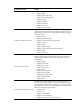
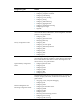
Confi
g
uration
g
uide Content
Fundamentals Configuration Guide
Describes how to use the command line interface of the switch, log in to
and set up the switch, and use the basic management functions. This
guide includes:
• Using the CLI
• Login overview
• Logging in through the console port for the first device access
• Logging in to the CLI
• Accessing the device through SNMP
• Controlling user access
• Configuring RBAC
• Configuring FTP
• Configuring TFTP
• Managing the file system
• Managing configuration files
• Upgrading software
• ISSU overview
• Performing an ISSU by using issu series commands
• Performing an ISSU by using install series commands
• Managing the device
• Automatic configuration
• Configuring Tcl
IRF Configuration Guide
Describes the HP proprietary Intelligent Resilient Framework (IRF)
technology, which provides data center class availability and
scalability. IRF creates a fabric from multiple switches. The switches that
form the IRF fabric work in 1:N redundancy and appear as one unit in
the network. IRF improves management efficiency and streamlines
network topologies. It is suitable for highly reliable enterprise networks
and data centers. This guide includes:
• IRF overview
• Configuring IRF
Layer 2—LAN Switching
Configuration Guide
Covers Layer 2 technologies and features used on a LAN switched
network, such as VLAN technology, port isolation, Spanning Tree. You
can use these features to divide broadcast domains, remove Layer 2
loops, isolate users within a VLAN and so on. This guide includes:
• Configuring Ethernet interfaces
• Configuring loopback and null interfaces