
R21xx-HP FlexFabric 11900 ACL and QoS Command Reference

6
name acl-name: Specifies an ACL by its name. The acl-name argument takes a case-insensitive string of
1 to 63 characters. It must start with an English letter. For a basic ACL or advanced ACL, if you do not
specify the ipv6 keyword, this option specifies the name of an IPv4 basic ACL or advanced ACL. If you
specify the ipv6 keyword, this option specifies the name of an IPv6 basic ACL or advanced ACL.
Usage guidelines
This command displays ACL rules in config or depth-first order, whichever is configured.
Examples
# Display configuration and match statistics for IPv4 basic ACL 2001.
<Sysname> display acl 2001
Basic ACL 2001, named flow, 1 rule, match-order is auto,
This is an IPv4 basic ACL.
ACL's step is 5
rule 5 permit source 1.1.1.1 0 (5 times matched)
rule 5 comment This rule is used on Ten-GigabitEthernet 1/0/1.
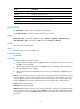
Table 1 Command output
Field
Descri
p
tion
Basic ACL 2001
Category and number of the ACL. The following field information is about
IPv4 basic ACL 2000.
named flow
The name of the ACL is flow. If the ACL is not named, this field displays
-none-.
1 rule The ACL contains one rule.
match-order is auto
The match order for the ACL is auto, which sorts ACL rules in depth-first
order. This field is not present when the match order is config.
This is an IPv4 basic ACL. Description of this ACL.
ACL's step is 5 The rule numbering step is 5.
rule 5 permit source 1.1.1.1 0 Content of rule 5.
5 times matched
There have been five matches for the rule. The statistic counts only ACL
matches performed in software.
This field is not displayed when no packets matched the rule.
rule 5 comment This rule is used
on Ten-GigabitEthernet 1/0/1.
Comment of ACL rule 5.
display packet-filter
Use display packet-filter to display whether an ACL has been successfully applied to an interface for
packet filtering.
Syntax
In standalone mode:
display packet-filter { interface [ interface-type interface-number ] [ inbound | outbound ] | interface
vlan-interface vlan-interface-number [ inbound | outbound ] [ slot slot-number ] }
In IRF mode: