
R21xx-HP FlexFabric 11900 ACL and QoS Command Reference
44
Usage guidelines
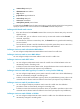
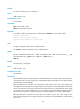
If a QoS policy contains a VLAN tag adding action, apply it only to the incoming traffic of an interface.
If the traffic behavior already contains a VLAN tag adding action, the new one overwrites the old one.
Examples
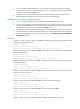
# Configure traffic behavior b1 to add VLAN tag 123.
<Sysname> system-view
[Sysname] traffic behavior b1
[Sysname-behavior-b1] nest top-most vlan 123
redirect
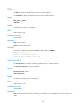
Use redirect to configure a traffic redirecting action in the traffic behavior.
Use undo redirect to delete the traffic redirecting action.
Syntax
redirect { cpu | interface interface-type interface-number }
undo redirect { cpu | interface interface-type interface-number }
Default
No traffic redirecting action is configured.
Views
Traffic behavior view
Predefined user roles
network-admin
Parameters
cpu: Redirects traffic to the CPU.
interface: Redirects traffic to an interface.
interface-type interface-number: Specifies an interface by its type and number.
Usage guidelines
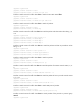
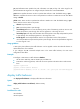
Redirecting traffic to CPU and redirecting traffic to an interface are mutually exclusive with each other in
the same traffic behavior. The last redirecting action configured takes effect.
Examples
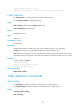
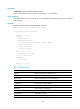
# Configure redirecting traffic to Ten-GigabitEthernet 1/0/1 in traffic behavior database.
<Sysname> system-view
[Sysname] traffic behavior database
[Sysname-behavior-database] redirect interface ten-gigabitethernet1/0/1
Related commands
• classifier behavior
• qos policy
• traffic behavior