
R21xx-HP FlexFabric 11900 ACL and QoS Command Reference

62
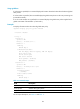
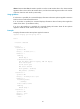
# Display information about QoS policy named 1 applied to VLANs.
<Sysname> display qos vlan-policy name 1
Policy 1
Vlan 2: outbound
Table 23 Command output
Field Descri
p
tion
Direction Direction in which the QoS policy is applied for the VLAN.
Green packets Statistics about green packets.
Red packets Statistics about red packets.
Vlan 2: outbound The QoS policy is applied to the outbound direction of VLAN 2.
For the output description, see Table 15 and Table 17.
qos apply policy (interface view, control plane view)
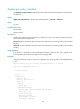
Use qos apply policy to apply a QoS policy.
Use undo qos apply policy to remove the QoS policy.
Syntax
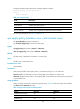
qos apply policy policy-name { inbound | outbound }
undo qos apply policy policy-name { inbound | outbound }
Default
No QoS policy is applied to an interface or control plane.
Views
Interface view, control plane view
Predefined user roles
network-admin
Parameters
policy-name: Specifies a QoS policy name, a case-sensitive string of 1 to 31 characters.
inbound: Applies the QoS policy to the incoming traffic of an interface or control plane.
outbound: Applies the QoS policy to the outgoing traffic of an interface. This keyword is not supported
in control plane view.
Usage guidelines
When you apply a QoS policy containing a specific action, Table 24 shows the support of SF cards for
the inbound and outbound keywords.
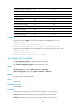
Table 24 Support of SF cards for different actions
Action inbound
outbound
Class-based accounting Yes Yes
Traffic policing Yes Yes
Traffic filtering Yes Yes