
R21xx-HP FlexFabric 11900 ACL and QoS Command Reference

82
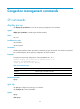
You must use the qos wrr command to enable WRR queuing before you can configure this command on
an interface.
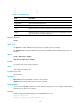
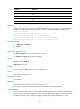
The queue-id argument can be either a number or a keyword. Table 32 sh
ows the number-keyword map.
Examples
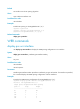
# Enable packet-based WRR queuing on Ten-GigabitEthernet 1/0/1, and assign queue 0 to the SP
group.
<Sysname> system-view
[Sysname] interface ten-gigabitethernet 1/0/1
[Sysname-Ten-GigabitEthernet1/0/1] qos wrr weight
[Sysname-Ten-GigabitEthernet1/0/1] qos wrr 0 group sp
Related commands
• display qos wrr interface
• qos wrr
WFQ commands
display qos wfq interface
Use display qos wfq interface to display the WFQ configuration on an interface.
Syntax
display qos wfq interface [ interface-type interface-number ]
Views
Any view
Predefined user roles
network-admin
network-operator
Parameters
interface-type interface-number: Specifies an interface by its type and number. If no interface is specified,
this command displays the WFQ configuration of all the interfaces.
Examples
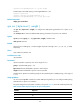
# Display the WFQ configuration of Ten-GigabitEthernet 1/0/1.
<Sysname> display qos wfq interface ten-gigabitethernet 1/0/1
Interface: Ten-GigabitEthernet1/0/1
Output queue: Hardware Weighted Fair Queuing
Queue ID Group Byte-count Min-Bandwidth
----------------------------------------------------------------
be 1 1 64
af1 1 1 64
af2 1 1 64
af3 1 1 64
af4 1 1 64
ef 2 1 64