
R21xx-HP FlexFabric 11900 ACL and QoS Command Reference
86
undo qos wfq queue-id
Default
When WFQ queuing is used on an interface, all the queues are in the WFQ group.
Views
Layer 2 Ethernet interface view
Predefined user roles
network-admin
Parameters
queue-id: Specifies a queue by its ID in the range of 0 to 7.
sp: Assigns a queue to the SP group, which uses the SP queue scheduling algorithm.
Usage guidelines
This command is available only on a WFQ-enabled interface.
Queues in the SP group are scheduled with SP, instead of WFQ.
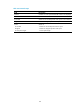
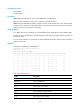
The queue-id argument can be either a number or a keyword. Table 32 sh
ows the number-keyword map.
Examples
# Enable weight-based WFQ on interface Ten-GigabitEthernet 1/0/1, and assign queue 0 to the SP
group.
<Sysname> system-view
[Sysname] interface ten-gigabitethernet 1/0/1
[Sysname-Ten-GigabitEthernet1/0/1] qos wfq weight
[Sysname-Ten-GigabitEthernet1/0/1] qos wfq 0 group sp
Related commands
• display qos wfq interface
• qos bandwidth queue
• qos wfq
Displaying per-port queue-based traffic statistics
commands
display qos queue-statistics
Use display qos queue-statistics interface to display statistics collected for an interface on a per-queue
basis.
Syntax
display qos queue-statistics interface interface-type interface-number outbound
Views
network-admin
network-operator