
R21xx-HP FlexFabric 11900 ACL and QoS Command Reference

91
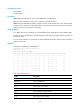
Field Descri
p
tion
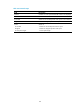
yprob Drop probability for yellow packets.
rmin Lower limit for red packets.
rmax Upper limit for red packets.
rprob Drop probability for red packets.
exponent Exponent for average queue length calculation.
ECN
Indicates whether ECN is enabled for the queue:
• Y—Enabled.
• N—Disabled.
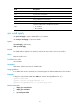
qos wred apply
Use qos wred apply to apply a WRED table on an interface.
Use undo qos wred apply to restore the default.
Syntax
qos wred apply [ table-name ]
undo qos wred apply
Default
No WRED table is applied to an interface, and the tail drop mode is used on an interface.
Views
Ethernet interface view
Predefined user roles
network-admin
Parameters
table-name: Specifies the name of a WRED table.
Usage guidelines
If no WRED table name is specified, this command applies the default WRED table to the interface.
Examples
# Apply the queue-based WRED table table1 to interface Ten-GigabitEthernet 1/0/1.
<Sysname> system-view
[Sysname] interface ten-gigabitethernet 1/0/1
[Sysname-Ten-GigabitEthernet1/0/1] qos wred apply table1
Related commands
• display qos wred interface
• display qos wred table
• qos wred queue table