
R21xx-HP FlexFabric 11900 ACL and QoS Configuration Guide

8
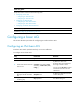
Ste
p
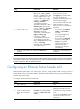
Command Remarks
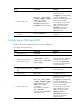
5. Create or edit a rule.
rule [ rule-id ] { deny | permit }
protocol [ { { ack ack-value | fin
fin-value | psh psh-value | rst
rst-value | syn syn-value | urg
urg-value } * | established } |
counting | destination
{ dest-address dest-prefix |
dest-address/dest-prefix | any } |
destination-port operator port1
[ port2 ] | dscp dscp | flow-label
flow-label-value | fragment |
icmp6-type { icmp6-type
icmp6-code | icmp6-message } |
logging | routing [ type
routing-type ] | source
{ source-address source-prefix |
source-address/source-prefix |
any } | source-port operator port1
[ port2 ] | time
-range
time-range-name | vpn-instance
vpn-instance-name ] *
By default, IPv6 advanced ACL
does not contain any rule.
The logging keyword takes effect
only when the module (for
example, packet filtering) that uses
the ACL supports logging.
If an IPv6 advanced ACL is for QoS
traffic classification or packet
filtering, to ensure a successful ACL
application:
• Do not specify the fragment,
routing, or
vpn-instance
keyword
s.
• Do not specify neq for the
operator argument.
• Do not specify the flow-label
keyword, or specify gt, lt, or
range for the operator
argument if the ACL is for
outbound QoS traffic
classification or outbound
packet filtering.
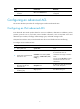
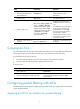
6. (Optional.) Add or edit a rule
comment.
rule rule-id comment text
By default, no rule comments are
configured.
NOTE:
IPv6 advanced ACLs can match IPv6 packets with all types of extension headers. If the ACL is to match the
data from the upper layer in the packet payload, make sure the IPv6 packets have up to two extension
headers and have no IPv6 encapsulation header.
Configuring an Ethernet frame header ACL
Ethernet frame header ACLs, also called "Layer 2 ACLs," match packets based on Layer 2 protocol
header fields, such as source MAC address, destination MAC address, 802.1p priority (VLAN priority),
and link layer protocol type.
To configure an Ethernet frame header ACL:
Ste
p
Command Remarks
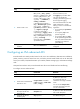
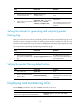
1. Enter system view. system-view N/A
2. Create an Ethernet frame
header ACL and enter its
view.
acl number acl-number [ name
acl-name ] [ match-order { auto |
config } ]
By default, no ACL exists.
Ethernet frame header ACLs are
numbered in the range of 4000 to
4999.
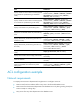
You can use the acl name acl-name
command to enter the view of a
named ACL.