
R21xx-HP FlexFabric 11900 ACL and QoS Configuration Guide

9
Ste
p
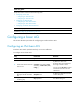
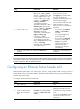
Command Remarks
3. (Optional.) Configure a
description for the Ethernet
frame header ACL.
description text
By default, an Ethernet frame
header ACL has no ACL
description.
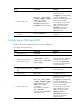
4. (Optional.) Set the rule
numbering step.
step step-value The default setting is 5.
5. Create or edit a rule.
rule [ rule-id ] { deny | permit } [ cos
vlan-pri | counting | dest-mac
dest-address dest-mask | { lsap
lsap-type lsap-type-mask | type
protocol-type protocol-type-mask }
| source-mac source-address
source-mask | time-range
time-range-name ] *
By default
,
an Ethernet frame
header ACL does not contain any
rule.
If an Ethernet frame header ACL is
for QoS traffic classification or
packet filtering, to use the lsap
keyword, the lsap-type argument
must be AAAA, and the
lasp-type-mask argument must be
FFFF. Otherwise, the ACL cannot
be function correctly.
6. (Optional.) Add or edit a rule
comment.
rule rule-id comment text
By default, no rule comments are
configured.
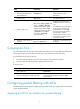
Copying an ACL
You can create an ACL by copying an existing ACL (source ACL). The new ACL (destination ACL) has the
same properties and content as the source ACL, but not the same ACL number and name.
To successfully copy an ACL, make sure:
• The destination ACL number is from the same category as the source ACL number.
• The source ACL already exists, but the destination ACL does not.
To copy an ACL:
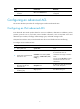
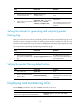
Ste
p
Command
1. Enter system view.
system-view
2. Copy an existing ACL to create a new ACL.
acl [ ipv6 ] copy { source-acl-number | name
source-acl-name } to { dest-acl-number | name
dest-acl-name }
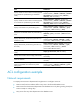
Configuring packet filtering with ACLs
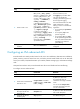
This section describes procedures for applying an ACL to filter incoming or outgoing IPv4 or IPv6 packets
on the specified interface.
Applying an ACL to an interface for packet filtering