
R21xx-HP FlexFabric 11900 ACL and QoS Configuration Guide

10
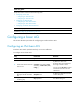
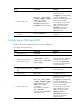
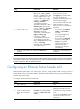
Ste
p
Command
Remarks
1. Enter system view. system-view N/A
2. Enter Ethernet interface view
or VLAN interface view.
interface interface-type
interface-number
N/A
3. Apply an ACL to the interface
to filter packets.
packet-filter [ ipv6 ] { acl-number |
name acl-name } { inbound |
outbound } [ hardware-count ]
By default, an interface does not
filter packets.
You can apply a maximum of one
ACL to the same direction of an
interface.
Setting the interval for generating and outputting packet
filtering logs
After you set the interval, the device periodically generates and outputs the packet filtering logs to the
information center, including the number of matching packets and the matched ACL rules. For more
information about information center, see Network Management and Monitoring Configuration Guide.
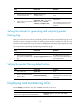
To set the interval for generating and outputting packet filtering logs:
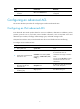
Ste
p
Command
Remarks
1. Enter system view.
system-view N/A
2. Set the interval for generating
and outputting packet filtering
logs.
acl [ ipv6 ] logging interval interval
The default setting is 0 minutes,
which mean that no packet filtering
logs are generated.
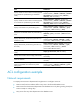
Setting the packet filtering default action
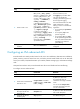
Ste
p
Command
Remarks
1. Enter system view.
system-view N/A
2. Set the packet filtering default
action to deny.
packet-filter default deny
By default, the packet filter permits
packets that do not match any ACL
rule to pass.
Displaying and maintaining ACLs
Execute display commands in any view and reset commands in user view.
Task Command
Display ACL configuration and match statistics.
display acl [ ipv6 ] { acl-number | all | name
acl-name }