
R21xx-HP FlexFabric 11900 ACL and QoS Configuration Guide

23
protocol group type to identify the type of packets sent to the control plane. You can reference
protocol types or protocol group types in if-match commands in traffic class view for traffic
classification and then re-configure traffic behaviors for these traffic classes as required. You can
use the display qos policy control-plane pre-defined command to display them.
• If a QoS policy applied to the control plane uses if-match control-plane protocol-group or if-match
control-plane protocol for traffic classification in a class, the action in the associated traffic behavior
can only be car or the combination of car and accounting packet, and only the cir keyword in the
car action can be applied correctly.
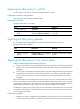
Configuration procedure
To apply the QoS policy to the control plane:
Ste
p
Command
Remarks
1. Enter system view.
system-view N/A
2. Enter control plane view
(in standalone mode).
control-plane slot slot-number
N/A
3. Enter control plane view
(in IRF mode).
control-plane chassis chassis-number slot
slot-number
N/A
4. Apply the QoS policy to
the control plane.
qos apply policy policy-name inbound
By default, no QoS policy
is applied to a control
plane.
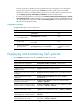
Displaying and maintaining QoS policies
Execute display commands in any view and reset commands in user view.
Task Command
Display traffic class configuration.
display traffic classifier user-defined [ classifier-name ]
Display traffic behavior configuration.
display traffic behavior user-defined [ behavior-name ]
Display QoS and ACL resource usage (in
standalone mode).
display qos-acl resource [ slot slot-number ]
Display QoS and ACL resource usage (in
IRF mode).
display qos-acl resource [ chassis chassis-number slot slot-number ]
Display user-defined QoS policy
configuration.
display qos policy user-defined [ policy-name [ classifier
classifier-name ] ]
Display QoS policy configuration on the
specified or all interfaces.
display qos policy interface [ interface-type interface-number ]
[ inbound | outbound ]
Display information about QoS policies
applied to VLANs (in standalone mode).
display qos vlan-policy { name policy-name | vlan vlan-id } [ slot
slot-number ] [ inbound | outbound ]
Display information about QoS policies
applied to VLANs (in IRF mode).
display qos vlan-policy { name policy-name | vlan [ vlan-id ] }
[ chassis chassis-number slot slot-number ] [ inbound | outbound ]
Display information about QoS policies
applied globally (in standalone mode).
display qos policy global [ slot slot-number ] [ inbound |
outbound ]
Display information about QoS policies
applied globally (in IRF mode).
display qos policy global [ chassis chassis-number slot
slot-number ] [ inbound | outbound ]