
R21xx-HP FlexFabric 11900 ACL and QoS Configuration Guide

40
Ste
p
Command
Remarks
1. Enter system view.
system-view N/A
2. Enter interface view.
interface interface-type interface-number
N/A
3. Configure the rate limit
for the interface.
qos lr { inbound | outbound } cir
committed-information-rate [ cbs
committed-burst-size ]
By default, rate limit is not
configured on an interface.
On the Switch Series, the
granularity of rate limit is 8 kbps.
Displaying and maintaining traffic policing, GTS,
and rate limit
Execute display commands in any view.
Task Command
Display QoS and ACL resource usage (in
standalone mode).
display qos-acl resource [ slot slot-number ]
Display QoS and ACL resource usage (in IRF
mode).
display qos-acl resource [ chassis chassis-number slot
slot-number ]
Display traffic behavior configuration
information.
display traffic behavior user-defined [ behavior-name ]
Display GTS configuration and statistics on
an interface.
display qos gts interface [ interface-type interface-number ]
Display rate limit configuration and statistics
on an interface.
display qos lr interface [ interface-type interface-number ]
For more information about the display qos-acl resource command, see ACL and QoS Command
Reference.
Traffic policing configuration example
Network requirements
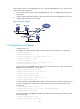
As shown in Figure 12:
• Ten-GigabitEthernet 1/0/3 of Device A is connected to Ten-GigabitEthernet 1/0/1 of Device B.
• Server, Host A, and Host B can access the Internet through Device A and Device B.
Perform traffic control on Ten-GigabitEthernet 1/0/1 of Device A for traffic received from Server and
Host A, respectively, to meet the following requirements:
• Limit the rate of traffic from Server to 102400 kbps: Transmit the conforming traffic, mark the excess
traffic with DSCP value 0, and then transmit the traffic.
• Limit the rate of traffic from Host A to 25600 kbps: Transmit the conforming traffic, and drop the
excess traffic.