
R21xx-HP FlexFabric 11900 ACL and QoS Configuration Guide

41
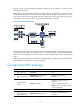
Perform traffic control on Ten-GigabitEthernet 1/0/1 and Ten-GigabitEthernet 1/0/2 of Device B to
meet the following requirements:
• Limit the total incoming traffic rate of Ten-GigabitEthernet 1/0/1 to 204800 kbps and drop the
excess traffic.
• Limit the outgoing HTTP traffic (traffic accessing the Internet) rate of Ten-GigabitEthernet 1/0/2 to
102400 kbps and drop the excess traffic.
Figure 12 Network diagram
Configuration procedures
1. Configure Device A:
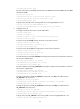
# Configure ACL 2001 and ACL 2002 to match traffic from Server and Host A, respectively.
<DeviceA> system-view
[DeviceA] acl number 2001
[DeviceA-acl-basic-2001] rule permit source 1.1.1.1 0
[DeviceA-acl-basic-2001] quit
[DeviceA] acl number 2002
[DeviceA-acl-basic-2002] rule permit source 1.1.1.2 0
[DeviceA-acl-basic-2002] quit
# Create a class named server and use ACL 2001 as the match criterion. Create a class named
host and use ACL 2002 as the match criterion.
[DeviceA] traffic classifier server
[DeviceA-classifier-server] if-match acl 2001
[DeviceA-classifier-server] quit
[DeviceA] traffic classifier host
[DeviceA-classifier-host] if-match acl 2002
[DeviceA-classifier-host] quit
# Create a behavior named server and configure the CAR action for the behavior as follows: Set
the CIR to 102400 kbps, and mark the excess packets (red packets) with DSCP value 0 and
transmit them.
[DeviceA] traffic behavior server
[DeviceA-behavior-server] car cir 102400 red remark-dscp-pass 0
[DeviceA-behavior-server] quit
# Create a behavior named host and configure the CAR action for the behavior as follows: Set the
CIR to 25600 kbps.
[DeviceA] traffic behavior host
[DeviceA-behavior-host] car cir 25600