
R21xx-HP FlexFabric 11900 ACL and QoS Configuration Guide

47
2.
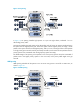
Schedules packets of queues in the WFQ groups based on their minimum guaranteed bandwidth
settings when the SP queues are empty.
3. Uses WFQ to schedule the queues in the WFQ groups in a round robin fashion according to their
weights.
4. Sends traffic of the two WFQ groups at a 1:1 ratio.
Configuration approaches and task list
To achieve congestion management, perform the following tasks:
Tasks at a
g
lance
(Required.) Perform one of the following tasks to configure per-queue congestion management:
• Configuring SP queuing
• Configuring WRR queuing
• Configuring WFQ queuing
• Configuring SP+WRR queuing
• Configuring SP+WFQ queuing
Configuring SP queuing
Configuration procedure
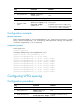
Ste
p
Command
Remarks
1. Enter system view.
system-view N/A
2. Enter interface view.
interface interface-type
interface-number
N/A
3. Configure SP queuing.
qos sp By default, an interface uses SP queuing.
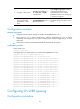
Configuration example
Configure Ten-GigabitEthernet 1/0/1 to use SP queuing:
# Enter system view
<Sysname> system-view
# Configure Ten-GigabitEthernet1/0/1 to use SP queuing.
[Sysname] interface ten-gigabitethernet 1/0/1
[Sysname-Ten-GigabitEthernet1/0/1] qos sp
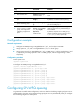
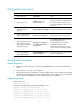
Configuring WRR queuing
Configuration procedure