
R21xx-HP FlexFabric 11900 ACL and QoS Configuration Guide

51
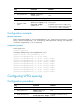
Configuration procedure
Ste
p
Command
Remarks
1. Enter system view.
system-view N/A
2. Enter interface view.
interface interface-type
interface-number
Use either command.
Settings in interface view take effect on
the current interface. Settings in port
group view take effect on all ports in the
port group.
3. Enable byte-count or
packet-based WFQ
queuing.
qos wfq [ byte-count | weight ]
By default, an interface uses SP queuing.
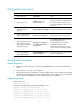
4. Assign a queue to the SP
queue scheduling group.
qos wfq queue-id group sp
By default, all the queues of a
WFQ-enabled port are in WFQ group
1.
5. Assign a queue to the WFQ
queue scheduling group,
and configure a scheduling
weight for the queue.
qos wfq queue-id group { 1 |
2 } { weight | byte-count }
schedule-value
Select weight or byte-count according to
the WFQ type (byte-count or
packet-based) you have enabled.
By default, all the queues of a
WFQ-enabled interface are in WFQ
group 1 and have a scheduling weight
of 1.
6. (Optional.) Configure the
minimum guaranteed
bandwidth for a queue.
qos bandwidth queue queue-id
min bandwidth-value
The default setting is 64 kbps for each
queue in a WFQ group.
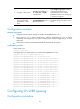
Configuration example
Network requirements
• Configure SP+WFQ queuing on interface Ten-GigabitEthernet 1/0/1, and use packet-based
WFQ.
• Assign queues 0, 1, 2, and 3 to the SP group.
• Assign queues 4 and 5 to WFQ group 1, with the weights being 1 and 2, respectively, and assign
queues 6 and 7 to WFQ group 2, with the weights being 1 and 3, respectively, and configure the
minimum guaranteed bandwidth for each of the four queues as 128 Mbps.
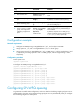
Configuration procedure
# Enter system view.
<Sysname> system-view
# Configure SP+WFQ queuing on Ten-GigabitEthernet 1/0/1.
[Sysname] interface ten-gigabitEthernet 1/0/1
[Sysname-Ten-GigabitEthernet1/0/1] qos wfq weight
[Sysname-Ten-GigabitEthernet1/0/1] qos wfq 0 group sp
[Sysname-Ten-GigabitEthernet1/0/1] qos wfq 1 group sp
[Sysname-Ten-GigabitEthernet1/0/1] qos wfq 2 group sp
[Sysname-Ten-GigabitEthernet1/0/1] qos wfq 3 group sp