
R21xx-HP FlexFabric 11900 ACL and QoS Configuration Guide
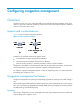
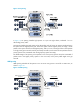
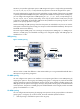

52
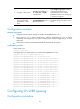
[Sysname-Ten-GigabitEthernet1/0/1] qos wfq 4 group 1 weight 1
[Sysname-Ten-GigabitEthernet1/0/1] qos bandwidth queue 4 min 128000
[Sysname-Ten-GigabitEthernet1/0/1] qos wfq 5 group 1 weight 2
[Sysname-Ten-GigabitEthernet1/0/1] qos bandwidth queue 5 min 128000
[Sysname-Ten-GigabitEthernet1/0/1] qos wfq 6 group 2 weight 1
[Sysname-Ten-GigabitEthernet1/0/1] qos bandwidth queue 6 min 128000
[Sysname-Ten-GigabitEthernet1/0/1] qos wfq 7 group 2 weight 3
[Sysname-Ten-GigabitEthernet1/0/1] qos bandwidth queue 7 min 128000
Displaying per-port queue-based traffic statistics
Per-port queue-based accounting collects statistics for each port on a per-queue basis, such as the
number of packets buffered in each queue, the number of packets sent out of each queue, and the
number of packets dropped in each queue.
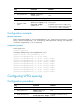
To display per-port queue-based traffic statistics:
Task Command
Remarks
Display per-port queue-based
traffic statistics.
display qos queue-statistics interface [ interface-type
interface-number ] [ outbound ] [ | { begin | exclude
| include } regular-expression ]
Available in any view.
Displaying and maintaining congestion
management
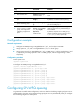
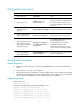
Execute display commands in any view.
Task Command
Display SP queuing configuration. display qos sp interface [ interface-type interface-number ]
Display WRR queuing configuration. display qos wrr interface [ interface-type interface-number ]
Display WFQ queuing configuration. display qos wfq interface [ interface-type interface-number ]