
R21xx-HP FlexFabric 11900 ACL and QoS Configuration Guide

63
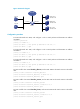
Figure 18 Network diagram
Configuration procedure
# Create advanced ACL 3000, and configure a rule to match packets with destination IP address
192.168.0.1.
<Device> system-view
[Device] acl number 3000
[Device-acl-adv-3000] rule permit ip destination 192.168.0.1 0
[Device-acl-adv-3000] quit
# Create advanced ACL 3001, and configure a rule to match packets with destination IP address
192.168.0.2.
[Device] acl number 3001
[Device-acl-adv-3001] rule permit ip destination 192.168.0.2 0
[Device-acl-adv-3001] quit
# Create advanced ACL 3002, and configure a rule to match packets with destination IP address
192.168.0.3.
[Device] acl number 3002
[Device-acl-adv-3002] rule permit ip destination 192.168.0.3 0
[Device-acl-adv-3002] quit
# Create a traffic class named classifier_dbserver, and use ACL 3000 as the match criterion in the traffic
class.
[Device] traffic classifier classifier_dbserver
[Device-classifier-classifier_dbserver] if-match acl 3000
[Device-classifier-classifier_dbserver] quit
# Create a traffic class named classifier_mserver, and use ACL 3001 as the match criterion in the traffic
class.
[Device] traffic classifier classifier_mserver
[Device-classifier-classifier_mserver] if-match acl 3001
[Device-classifier-classifier_mserver] quit
# Create a traffic class named classifier_fserver, and use ACL 3002 as the match criterion in the traffic
class.
[Device] traffic classifier classifier_fserver
[Device-classifier-classifier_fserver] if-match acl 3002
[Device-classifier-classifier_fserver] quit
Internet
Host A
Host B
Device
Data server
192.168.0.1/24
Mail server
192.168.0.2/24
File server
192.168.0.3/24
XGE1/0/1 XGE1/0/2