
R21xx-HP FlexFabric 11900 ACL and QoS Configuration Guide



79
Ste
p
Command
Remarks
12. Display traffic accounting
configuration.
• In standalone mode:
{ display qos policy control-plane
slot slot-number [ inbound |
outbound ]
{ display qos policy global [ slot
slot-number ] [ inbound |
outbound ]
{ display qos policy interface
[ interface-type interface-number ]
[ inbound | outbound ]
{ display qos vlan-policy { name
policy-name | vlan [ vlan-id ] } [ slot
slot-number ] [ inbound |
outbound ]
• In IRF mode:
{ display qos policy control-plane
chassis chassis-number slot
slot-number [ inbound | outbound ]
{ display qos policy global [ chassis
chassis-number slot slot-number ]
[ inbound | outbound ]
{ display qos policy interface
[ interface-type interface-number ]
[ inbound | outbound ]
{ display qos vlan-policy { name
policy-name | vlan [ vlan-id ] }
[ chassis chassis-number slot
slot-number ] [ inbound |
outbound ]
Available in any view.
Configuration example
Network requirements
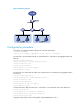
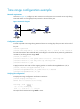
As shown in Figure 23, configure class-based accounting to collect statistics on the number of packets
s o u rc e d f r o m 1.1.1.1 / 24 a n d re c e i v e d o n Te n - G i g a b i t E t h e r n e t 1 / 0 / 1.
Figure 23 Network diagram