
R21xx-HP FlexFabric 11900 EVB Command Reference

9
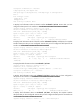
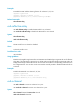
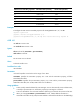
The brief information of interface(s) under bridge mode:
Link: ADM - administratively down; Stby - standby
Speed or Duplex: (a)/A - auto; H - half; F - full
Type: A - access; T - trunk; H - hybrid
Interface Link Speed Duplex Type PVID Description
SCH1/0/1:10.1 UP -- -- -- -- 12345678901234567890123456789
01234567890
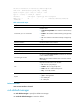
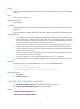
Table 6 Command output
Field Descri
p
tion
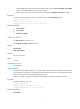
S-Channel1/0/1:10 current state
Interface status:
• Administratively DOWN—The interface is administratively
down.
• DOWN—The interface is administratively up but physically
down.
• UP—The interface is both administratively and physically
up.
Hardware Address Hardware address of the interface.
Description Description information for the interface.
PVID Default VLAN ID of the interface.
Port link-type Link type of the interface.
Trunk port encapsulation Encapsulation type of the trunk port.
Last clearing of counters
Last time the reset counters interface command was executed
to clear interface statistics.
Never indicates interface statistics have never been cleared
since startup.
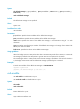
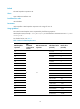
Link
Physical connection status of an interface:
• UP—The link is physically up.
• DOWN—The link is physically down.
• ADM—The link is administratively down.
• Stby—A standby interface.
Duplex
Duplex mode of an interface:
• (a)/A—Autonegotiation.
• H—Half-duplex.
• F—Full-duplex.
Related commands
reset counters interface s-channel
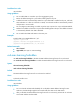
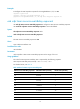
evb default-manager
Use evb default-manager to specify the default VSI manager.
Use undo evb default-manager to restore the default.