
R21xx-HP FlexFabric 11900 EVB Configuration Guide

9
Task Command
Display EVB summary. display evb summary
Display VSI information. display evb vsi [ verbose ] [ interface interface-type interface-number ]
Display information about an
S-channel interface or a VSI.
display interface [ s-channel [ interface-number:channel-id |
interface-number:channel-id.vsi-local-id ] ] [ brief [ description ] ]
Clear statistics for an S-channel
interface or a VSI.
reset counters interface [ s-channel [ interface-number:channel-id |
interface-number:channel-id.vsi-local-id ] ]
EVB configuration example
Network requirements
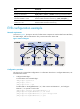
As shown in Figure 3, the Layer 2 network of a data center comprises two switches that form an IRF fabric,
four EVB bridges, and four EVB stations. They communicate within VLAN 100.
Figure 3 Network diagram
Configuration procedure
This section only contains EVB configurations. For information about how to configure EVB stations, see
the EVB station manual.
1. Configure EVB bridge 1:
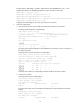
# Create VLAN 100 on EVB bridge 1.
<EVB_bridge1> system-view
[EVB_bridge1] vlan 100
[EVB_bridge1-vlan100] quit
# Enable EVB on Ten-GigabitEthernet 1/0/1 that connects to EVB station 1, and configure
Ethernet 1/1 to operate in trunk mode.
[EVB_bridge1] interface ten-gigabitethernet 1/0/1
[EVB_bridge1-Ten-GigabitEthernet1/0/1] evb enable
[EVB_bridge1-Ten-GigabitEthernet1/0/1] port link-type trunk
[EVB_bridge1-Ten-GigabitEthernet1/0/1] quit