
R21xx-HP FlexFabric 11900 EVB Configuration Guide

4
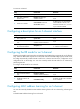
Ste
p
Command
Remarks
3. Enable EVB.
evb enable
By default, EVB is disabled on a
bridge port.
After EVB is enabled, a default
access-type S-channel with both
SCID and SVID as 1 is
automatically created on this port.
Configuring LLDP
EVB uses LLDP to transmit CDCP TLVs, and CDCP TLVs are carried by the LLDP packet that is addressed
using the Nearest non-TPMR Bridge address, so you must configure LLDP.
For detailed information about the lldp global enable, lldp enable and lldp agent nearest-nontpmr
admin-status commands, see Layer 2—LAN Switching Command Reference.
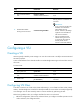
To configure LLDP:
Ste
p
Command
Remarks
1. Enter system view.
system-view N/A
2. Enable LLDP globally. lldp global enable
The default setting depends on the
device model.
3. Enter Layer 2 Ethernet
interface view.
interface interface-type
interface-number
N/A
4. Enable LLDP on the interface lldp enable
By default, LLDP is enabled on a
port.
5. Configure the Nearest
non-TPMR Bridge agent for
LLDP to operate in TxRx mode.
lldp agent nearest-nontpmr
admin-status txrx
The default mode is Disable.
Specifying a default VSI manager
When the bridge receives a VDP packet other than a De-Associate packet from a station, it contacts the
VSI manager specified in the VDP packet to get VSI resources and policies for the station.
The VSI manager ID TLV in a VDP packet carries the VSI manager's IP address. If the value for the TLV is
0, the VDP packet does not contain a VSI manager's IP address, so the bridge communicates with the
specified default VSI manager.
To specify a default VSI manager:
Ste
p
Command
Remarks
1. Enter system view. system-view N/A
2. Specify a default VSI
manager.
evb default-manager { { ip
ip-address | ipv6 ipv6-address |
name name } [ port port-number ] |
local-server }
By default, no default VSI manager
is specified.