
R21xx-HP FlexFabric 11900 EVB Configuration Guide

5
Configuring VDP negotiation parameters
After a station sends a VDP request other than a De-Associate request to the bridge, the bridge requests
the VSI resources and policies from the VSI manager. If the bridge receives no response from the VSI
manager before the VDP response-wait-delay time expires, the VDP negotiation fails. The VDP
response-wait-delay time on the EVB bridge is calculated as: VDP response-wait-delay time (seconds) =
2
VDP
resource-wait-delay
× 10
—
5
. The value of the VDP resource wait-delay exponent is the larger of the values
proposed by the station and bridge through EVB TLV.
When a Pre-Associate, Pre-Associate with Resource Reservation, or Associate request from a station is
successfully handled, the VSI manager notifies the bridge to create a VSI for the corresponding VM. Then
the bridge starts a "VDP keepalive timer" for the VSI. If the bridge receives no keepalive from the station
before the timer expires, it releases resources reserved for the association. The VDP keepalive time is
calculated as:
VDP keepalive time (seconds) = 1.5 × [ 2
VDP
keepalive
+ (2 × ECP maximum retransmission time + 1) × 2
ECP
retransmission
] × 10
—
5
. The value of the VDP keepalive exponent is the larger of the values proposed by the
station and bridge through EVB TLV. The ECP maximum retransmission time and ECP retransmission
exponent are fixed to 3 and 16 respectively.
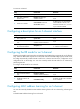
To configure VDP negotiation parameters:
Ste
p
Command
Remarks
1. Enter system view.
system-view N/A
2. Enter Layer 2 Ethernet
interface view.
interface interface-type
interface-number
N/A
3. Configure the VDP
resource-wait-delay timer
exponent.
evb vdp timer resource-wait-delay
exponent value
The default is 20.
4. Configure the VDP keepalive
timer exponent.
evb vdp timer keepalive exponent
value
The default is 20.
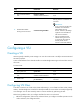
Configuring an S-channel
Creating an S-channel
An S-channel is automatically created by CDCP, and the system automatically saves the configuration in
the configuration file on the bridge. You can also manually create an S-channel by performing this task.
If an (SCID, SVID) pair for an S-channel is created both automatically and manually, the one
automatically created takes precedence.
A manually created S-channel has an access link type, and an automatically created S-channel has a
trunk link type.
Follow these guidelines when you create an S-channel:
• Create an S-channel on a port with EVB enabled. Otherwise an error is prompted.
• When you manually create an S-channel, do not use the SCID or SVID being used by any other
S-channel. Otherwise an error is prompted.
• To manually create or remove S-channel, disable CDCP to automatically perform these operations.