
R21xx-HP FlexFabric 11900 EVB Configuration Guide

6
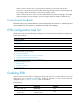
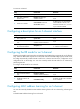
To create an S-channel:
Ste
p
Command
Remarks
1. Enter system view.
system-view N/A
2. Enter Layer 2 Ethernet
interface view.
interface interface-type
interface-number
N/A
3. Create an S-channel.
evb s-channel channel-id
service-vlan svlan-id
By default, only an automatically
created default S-channel, with
both SCID and SVID as 1, exists on
a port with EVB enabled.
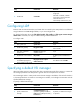
Configuring a description for an S-channel interface
Ste
p
Command
Remarks
1. Enter system view.
system-view N/A
2. Enter S-channel interface
view.
interface s-channel
interface-number:channel-id
N/A
3. Configure a description for
the S-channel interface.
description text
The default description information
is "interface name Interface."
Configuring the RR mode for an S-channel
EVB TLVs exchanged through LLDP allow an EVB station and EVB bridge to negotiate the use of reflective
relay. When the EVB station requests the use of the RR mode and the EVB bridge supports the RR mode,
the bridge automatically enables the RR mode for the S-channel and saves the configuration in the
configuration file on the bridge. You can also manually enable the RR mode for an S-channel by
performing this task.
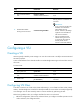
To configure the RR mode for an S-channel:
Ste
p
Command
Remarks
1. Enter system view.
system-view N/A
2. Enter S-channel interface
view.
interface s-channel
interface-number:channel-id
N/A
3. Enable RR mode for the
S-channel.
evb reflective-relay
By default, the RR mode is disabled
for an S-channel.
Configuring MAC address learning for an S-channel
You can also manually disable the MAC address learning function for an S-channel by performing this
task.
To disable MAC address learning for an S-channel: