
R21xx-HP FlexFabric 11900 FCoE Command Reference


6
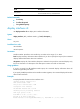
Field Descri
p
tion
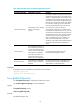
Link
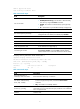
Physical link state of the interface:
• UP—The link is physically up.
• DOWN—The link is physically down.
• ADM—The link has been administratively shut down. To recover its
physical state, execute the undo shutdown command.
• Stby—The interface is a standby interface.
Protocol Protocol connection state of the interface: UP or DOWN.
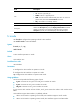
Description
Interface description configured by using the description command.
Without the description keyword, the display interface brief command
displays a maximum of 27 characters of the description. With the
description keyword, this command displays all of the description.
fc mode
Use fc mode to configure the operating mode of a VFC interface.
Use undo fc mode to restore the default.
Syntax
fc mode { e | f | np }
undo fc mode
Default
A VFC interface operates in F mode.
Views
VFC interface view
Predefined user roles
network-admin
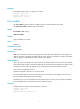
Parameters
e: Configures the VFC interface to operate in E mode.
f: Configures the VFC interface to operate in F mode.
np: Configures the VFC interface to operate in NP mode.
Usage guidelines
An FCF switch provides the following types of ports:
• F_Port—Connects to an N_Port or an NP_Port on another FC switch.
• E_Port—Connects to an E_Port on another FC switch.
• NP_Port—Connects to an F_Port on another FC switch.
E_Ports connect FCF switches to form a fabric, and F_Ports connect the nodes to FCF switches in the
fabric.
VFC interfaces support three modes: E, F (default), and NP.
• When an FCF switch is operating in FCF mode, VFC interfaces support E and F modes.
• When an FCF switch is operating in NPV mode, VFC interfaces support F and NP modes.