
R21xx-HP FlexFabric 11900 FCoE Command Reference



58
Views
VSAN view
Predefined user roles
network-admin
Parameters
value: Shortest SPF calculation interval in the range of 0 to 60 seconds.
Usage guidelines
When the LSDB changes, SPF calculations occur, which consume CPU resources. To prevent frequent SPF
calculations from consuming too many CPU resources, you can configure the shortest SPF calculation
interval.
The shortest SPF calculation interval defines the minimum interval between two consecutive SPF
calculations. Setting a small value means that FSPF responds quickly to fabric changes by recalculating
routes in a VSAN. A small value consumes more CPU resources.
Examples
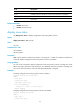
# Configure the shortest SPF calculation interval as 10 seconds in VSAN 2.
<Sysname> system-view
[Sysname] vsan 2
[Sysname-vsan2] fspf spf-hold-time 10
reset fspf counters
Use reset fspf counters to clear FSPF statistics.
Syntax
reset fspf counters [ vsan vsan-id ]
Views
User view
Predefined user roles
network-admin
Parameters
vsan vsan-id: Specifies a VSAN by its number in the range of 1 to 3839. If no VSAN is specified, this
command clears the FSPF statistics for all VSANs.
Examples
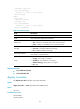
# Clear FSPF statistics in VSAN 2.
<Sysname> reset fspf counters vsan 2
Related commands
display fspf statistics