
R21xx-HP FlexFabric 11900 FCoE Command Reference

85
FC ping commands
fcping
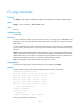
Use fcping to verify whether the destination address is reachable and to display the related statistics.
Syntax
fcping [ -c count | -t timeout ] * fcid fcid vsan vsan-id
Views
Any view
Predefined user roles
network-admin
Parameters
-c count: Specifies the number of echo requests to be sent, in the range of 0 to 2147483647 and
defaulting to 5. The value of 0 indicates that echo requests are continuously sent until you manually stop
sending them.
-t timeout: Specifies the timeout value in seconds of an echo reply. The value range is 1 to 10 and defaults
to 5. If the source does not receive an echo reply within the timeout period, it considers the echo reply
timed out.
fcid fcid: Specifies the destination address. If the destination is a node, the fcid argument indicates the FC
address of the node. If the destination is an FC switch, the fcid argument indicates the domain controller
address FFFCxx of the switch, where xx is the domain ID of the destination switch. For example, if the
domain ID of the destination switch is 3, its domain controller address is FFFC03.
vsan vsan-id: Specifies a VSAN by its number in the range of 1 to 3839.
Usage guidelines
To abort the FC ping operation during the execution of the command, press Ctrl+C.
Examples
# Check whether the device with destination address FFFC02 in VSAN 1 is reachable.
<Sysname> fcping fcid fffc02 vsan 1
FCPING fcid 0xfffc02: 128 data bytes, press CTRL_C to break.
Reply from 0xfffc02: bytes = 128 time = 1.281 ms
Reply from 0xfffc02: bytes = 128 time = 0.890 ms
Reply from 0xfffc02: bytes = 128 time = 0.889 ms
Reply from 0xfffc02: bytes = 128 time = 0.892 ms
Reply from 0xfffc02: bytes = 128 time = 0.894 ms
--- 0xfffc02 fcping statistics ---
5 packet(s) transmitted
5 packet(s) received
0.00% packet loss
round-trip min/avg/max = 0.889/0.969/1.281 ms
# FC ping packets fail to be delivered.